Calculator assumptions
Why Do Compound Interest Calculators Give Different Results?
Compare compound interest calculator results by checking rates, deposit timing and assumptions. See worked examples and what our dated tests found.
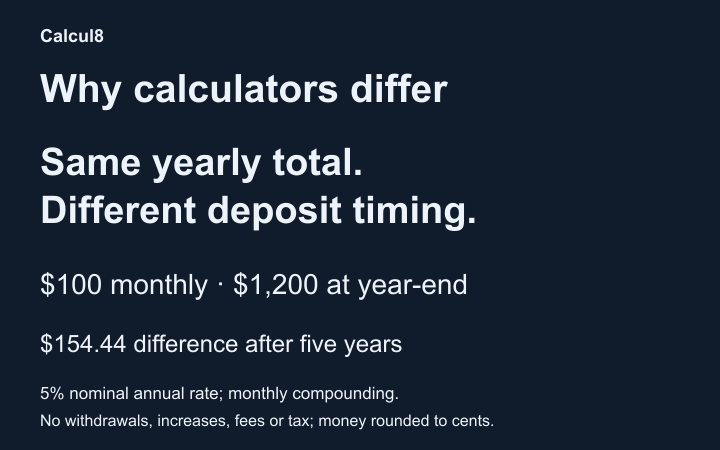
Compound interest calculators can give different answers because the same-looking inputs do not always describe the same calculation. One may treat a yearly deposit as a single payment; another may spread it across the months. Rate definitions, payment timing, partial periods and withdrawal limits can also change the result.
Start by matching the assumptions, then compare the arithmetic. The examples below use US dollars and hypothetical fixed rates. They explain differences in models; they are not investment forecasts or a ranking of calculator accuracy.
Check these settings before comparing balances
| Check | A difference to look for |
|---|---|
| Starting balance and output | Is each result the ending balance, interest alone or a balance adjusted for inflation? |
| Rate basis | Nominal annual rate, APY, or a daily/monthly rate? |
| Compounding | Annual, monthly, daily 365 or another day-count convention? |
| Term | Whole years, years plus months, or exact start/end dates? |
| New money | A deposit on each stated date, or an average monthly equivalent? |
| Timing | Money added before interest or after it? |
| Other assumptions | Contribution increases, withdrawals, reinvestment, fees, tax and rounding? |
For definitions and the distinction between a rate and its annual yield, read APY vs interest rate. For the basic formulas, use the compound-interest learning guide.
1. A nominal rate is different from APY
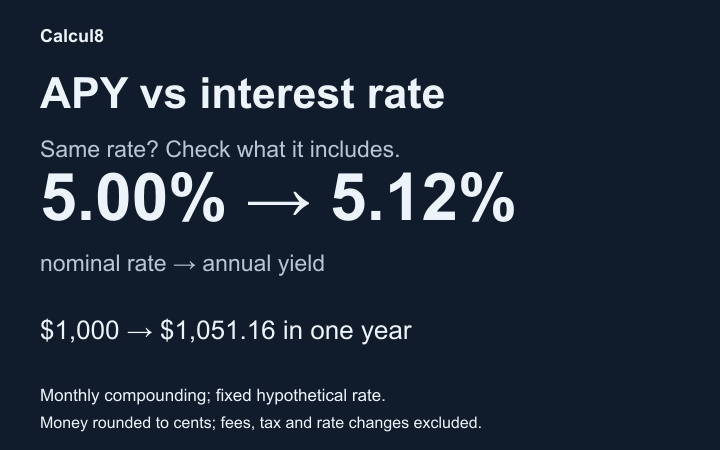
A nominal annual rate needs a compounding frequency. APY already includes compounding. Entering a quoted APY as though it were nominal, then compounding it again, can overstate a projection. The CFPB's definitions distinguish the two.
Keep $5,000 invested for five years at a 5% nominal annual rate, with all interest retained and no cash flows:
| Compounding | Ending balance |
|---|---|
| Yearly | $6,381.41 |
| Monthly | $6,416.79 |
The nominal rate is equal; the effective annual yield is not. If the effective annual yield were held equal instead, these full-year lump-sum balances would agree under the same constant-yield assumptions.
The California Board of Equalization's future-worth lesson explains why the rate must match its compounding period. A percentage quoted per month must not silently become the same percentage per year.
2. Beginning and end deposits earn different interest
Use a $5,000 starting balance, a 5% nominal annual rate, monthly compounding and five years. Add $100 every month, with no contribution increases or withdrawals:
| Monthly deposit timing | Ending balance |
|---|---|
| End of each month | $13,217.40 |
| Beginning of each month | $13,245.74 |
The beginning deposits earn one additional month of interest each. Both examples add $6,000 of new money. Their difference comes from timing, not an extra deposit or a different rate.
To reproduce them in the Compound Interest Calculator, choose US dollars, Initial amount $5,000, Interest rate 5%, Rate period Yearly, Compounding Monthly, and 5 years and 0 months. Set Regular money in/out to Add deposits, enter $100 Monthly with a 0% annual increase, and switch Timing between End of each month and Beginning of each month.
3. A yearly deposit can mean two different schedules
Now change the deposit to $1,200 Yearly, at the end, and keep the other settings above. Calcul8's General calculator converts regular cash flows into monthly equivalents. Here, $1,200 ÷ 12 becomes $100 at each month-end; it does not wait for a single payment at year-end.
Compare that model with five actual $1,200 year-end deposits:
| Schedule | New deposits over five years | Ending balance |
|---|---|---|
| $100 at each month-end | $6,000 | $13,217.40 |
| $1,200 at each year-end | $6,000 | $13,062.96 |
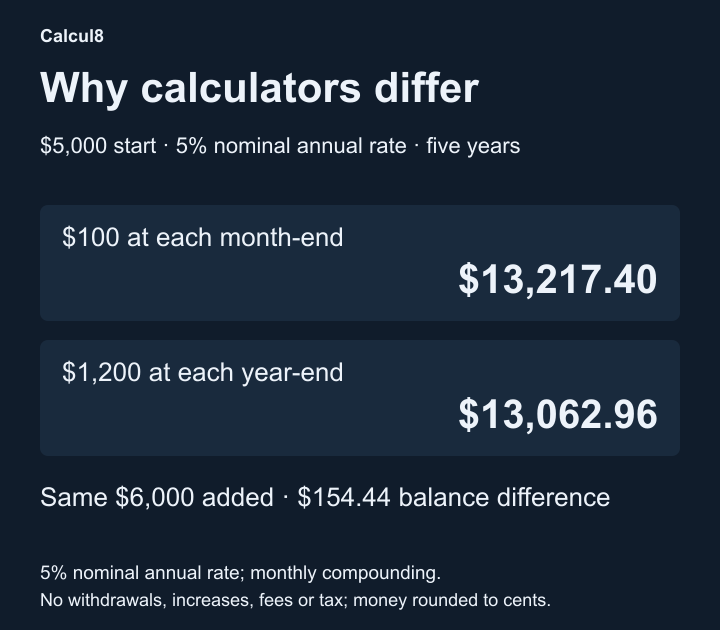
Open the full-size timing comparison to inspect the labels. The monthly schedule puts money to work earlier. Its ending balance is $154.44 higher in this example, despite identical total contributions.
With i = 0.05 ÷ 12, the monthly calculation is:
5,000 × (1 + i)^60 + 100 × ((1 + i)^60 − 1) ÷ i = $13,217.40
For the year-end schedule, grow each $1,200 deposit only for the months remaining after it arrives: 48, 36, 24, 12 and 0 months. Add those five grown deposits to 5,000 × (1 + i)^60 to get $13,062.96. The General calculator's Yearly deposit option uses the first schedule, not the second.
Weekly deposits require the same care. General spreads $25 weekly as $25 × 52 ÷ 12 per month. An equal-week model or a calendar with dated weekly payments can have different timing; those are not interchangeable schedules.
4. What happens when withdrawals exhaust the balance?
Start with $100, use 0% interest, and request $200 at each month-end for one year. Calcul8 caps actual withdrawals at the money available, so its final balance is $0.00 and total actual withdrawals are $100.
A model that keeps subtracting every requested withdrawal produces 100 − 200 × 12 = -$2,300.00. That negative number describes an unfunded shortfall in this example, not money still available to withdraw. A tool that floors balances at zero and one that continues below zero are answering different questions.
To check Calcul8, set Regular money in/out to Take withdrawals, Withdrawal amount $200 Monthly, annual increase 0%, Timing End of each month, and a 1 year and 0 months term. No deposits are included. It does not simulate borrowing to fund a shortfall.
5. Partial years, calendars and rounding also matter
For $1,000 at a 5% nominal annual rate, annual compounding and six months, General returns $1,024.70. Its fractional-period formula is 1,000 × 1.05^0.5. That mathematical growth curve is different from a model that posts no interest until the first annual credit, or one using simple interest for the partial year.
General projects in monthly periods and uses monthly-equivalent regular cash flows. The Daily Compound Interest Calculator uses its documented calendar-day schedule, selected days, reinvestment and cash-flow settings. Match dates, included days and timing before comparing the tools. Neither model reproduces every account's statement or interest-crediting rules; the CFPB's account-disclosure guidance identifies relevant terms to check.
Finally, distinguish display rounding from rounding during calculation. A screen may show cents while carrying more precision between periods. Rounding each day's interest to cents can produce a different path. Our worked examples retain full precision and round final money to cents; do not assume every tool or account uses that convention.
What our matched-input comparison found
In a bounded browser check on 23 October 2026, we tried 16 General scenarios on CalculatorSoup, Calculator.net and Investor.gov. We set compatible controls explicitly and recorded unsupported settings without substituting another scenario. This gave 48 external comparison cells:
- 32 matched Calcul8 to the displayed cent.
- 5 differed by amounts independently reproduced using alternative cash-flow or withdrawal models.
- 11 involved a rejected input or an unavailable setting, so they were not numerical matches or mismatches.
For the $1,200-yearly example above, CalculatorSoup and Calculator.net displayed $13,062.96, matching the independently calculated year-end schedule; Calcul8 displayed $13,217.40, matching its monthly-equivalent schedule. This numerical agreement supports the timing explanation. We did not inspect competitor source code.
The five explained differences comprised those two yearly-deposit results, one weekly-deposit result, and two depleted-withdrawal results. In the weekly case, Calcul8 displayed $13,784.12 and CalculatorSoup $13,795.92; the latter matches a model of 260 equal weekly periods using the effective weekly rate derived from monthly compounding. That is a numerical interpretation, not proof of a competitor's exact calendar or implementation. The depleted example gave -$2,300.00 on Calculator.net and Investor.gov, consistent with continuing the requested subtraction.
These are dated observations from a small matrix, not proof of correctness for every input, a guarantee of future website behavior or evidence that another calculator is faulty. Expectations were derived independently before observing outputs; external agreement was an additional comparison, not the source of the expected answers.
The external Daily comparison was inconclusive: the first form submission did not produce a result in that browser session, including a repeat after reloading. The five remaining planned Daily comparisons were not run externally. Six Calcul8 Daily cases passed independent expectations, but this did not establish Daily agreement with a competitor.
How to resolve a difference in your own calculation
- Compare a starting balance with no deposits or withdrawals first. Match the nominal rate, rate period, compounding and term.
- Add one cash flow. Check its exact arrival time before enabling a recurring schedule.
- Read how the tool treats yearly/weekly payments, partial terms and withdrawals that exceed the balance.
- Match tax, fees, inflation, contribution increases and reinvestment, or turn them off for a controlled test.
- Compare the ending balance, total actual contributions/withdrawals and interest separately. Inspect a period table or export if available.
If the assumptions genuinely match and the difference remains unexplained, keep the inputs, tool URLs, result date and the first period where the calculations diverge. That is useful evidence for investigating a possible defect. Matching assumptions is the first check; it does not rule out a real arithmetic or implementation error.